
FAQ — Casa Pacis
RETURN TO CASA PACIS HOME PAGE
—————————————————————-
Casa Pacis — ENTERTAINMENT SYSTEM
General Information:
--- We have a new (2025) 45" Samsung Smart TV.
— As PRIMARY option, stream your own programming.
--- As SECONDARY option we provide service by DirecTV (via satellite; with basic local SF Bay Area HD-TV programming).
— As THIRD option, simply “slave” from your laptop, via an HDMI cable connecting to Input 3 on the TV (bring your own HDMI cable).

EXPERT INSTRUCTIONS
… for Watching our DirecTV Programming:
Home —> Connected Devides —> “PC”

QUICK INSTRUCTIONS:
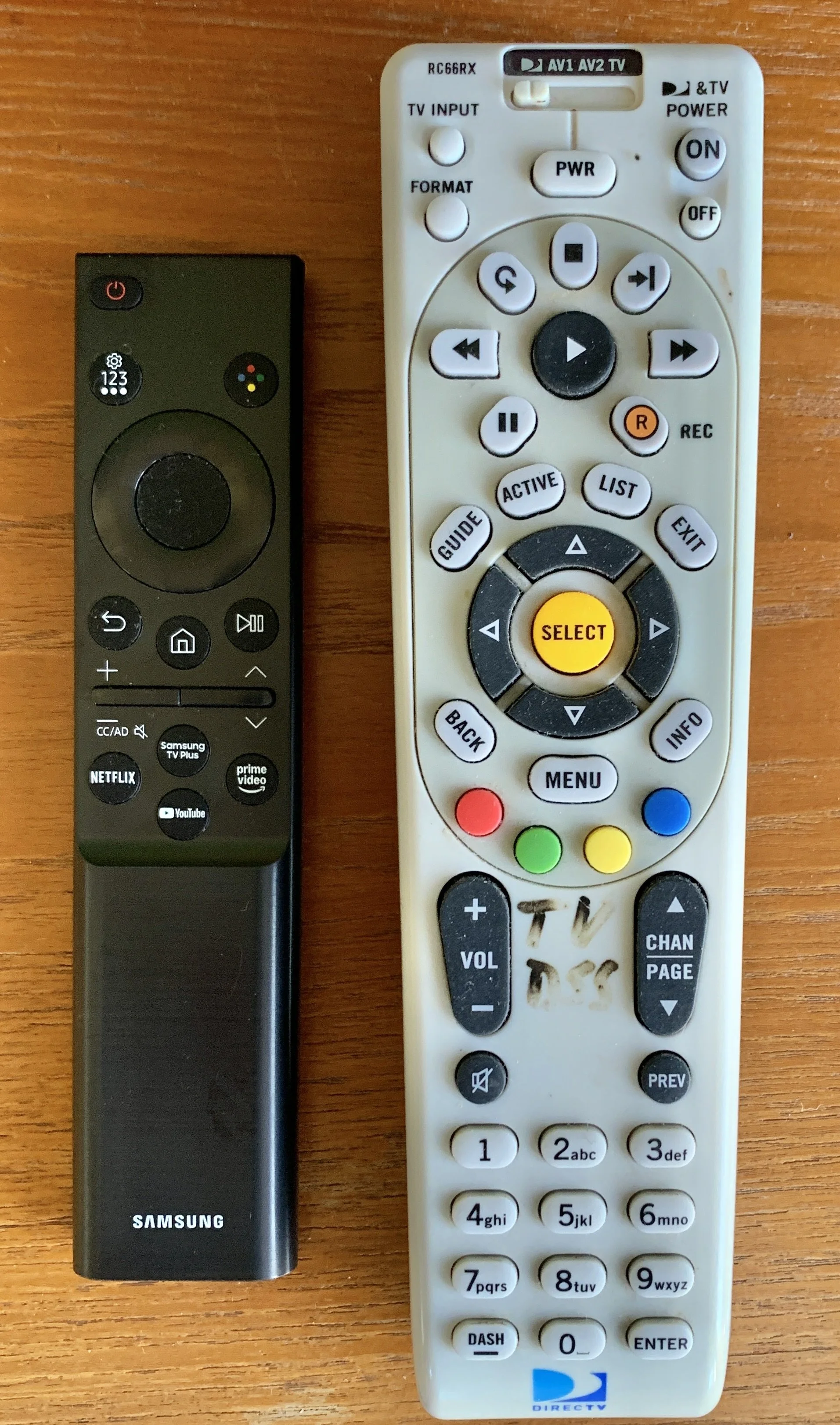
WHITE DirecTV remote and small BLACK Samsung TV control.
Watching TV
These instructions are very intuitive, and many other variations will work, too. Any “expert” contemporary TV viewer will have no problem. It is virtually impossible to make a mistake.
(1) Locate the WHITE (DirecTV) and the SMALL BLACK (Samsung TV) remotes.
Use the small black remote for sound level adjustment (the DirecTV remote is not programmed for sound).
(2) Pointing at the TV from about 2 yards afar, push the power/ON-button on either remote.
Wait a few seconds for live TV to start.(3) Use the white (DSS) remote to find your TV channel, etc. (EXCEPT for sound control, which is with the small BLACK remote ONLY).
(4) Channel numbers correspond to the SF Bay Area channel line-up (i.e., 2, 5, 7, 9, etc . for NBC, CBS, ABC, PBS, respectively)
Streaming — Using your own Programming
(1) Locate the SMALL BLACK (Samsung) remote. Use it for everything.
(2) Pointing to the TV from about 2 yards afar, push the HOUSE icon button.
(3) Sign in to enjoy your own programming
Get back from Streaming to TV mode
Navigate with SMALL BLACK remote to “Connected Devices”
Press TV (if sound and image appear, you’re done, else choose “PC” (NOT “TV”!!!!)
Incidental note: Disregard the louvre behind the TV; it is not functional.

DETAILED INSTRUCTIONS
General Information:
--- We have a new (2025) 45" Samsung Smart TV.
— We assume that our Guests’ PRIMARY option is that they want to use their own programming.
--- As SECONDARY option we provide service by DirecTV (via satellite; basic local SF Bay Area HD-TV programming).
— As THIRD option, simply “slave” from our laptop, via an HDMI cable to Input 3. (bring your own HDMI cable).
=================================
(1) Watching TV, using our DirecTV Programming:
--- Find the WHITE "DirecTV" remote and press the POWER "ON" button (top right on remote).
— Make sure that the slider in the center top of the remote is in the LEFT position.
— Find the (small, long) BLACK Samsung remote and press the (top) power button.
--- To turn the system off, simply press the POWER "OFF" button on the DirecTV remote (underneath the "ON" button) and press the POWER button on the Samsung remote.
--- Use the white DSS remote to select channels and all DirecTV programming tasks. The main DirecTV channels are numbered the same way as in the SF Bay Area (e.g., 5 is CBS, 7 is ABC, 9 is PBS, etc.); the 200s may include some of your favorite entertainment cable channels such as ESPN, TBS, etc. You may leave the DirecTV power on when you depart.
—- Do Not Purchase DirecTV Programming: Mind that we provide only BASIC DirecTV programming; e.g., we do not provide CNN, MSNOW, FOX NEWS, or any sports channels. We do not facilitate for guests to buy any not provided DirecTV programming. For your own special favorite channels use your own programming.
(2) Using your own Programming:
Our high-speed Internet is ideal for for streaming.
--- Find the small BLACK "Samsung" remote and press the POWER button at the top.
— The TV will come on and present the icons from which you select your programming.
(3) Streaming via HDMI cable from your Laptop:
Connect your HDMI cable from your laptop to INPUT 3 on the TV. You may have to use the BLACK Samsung remote, press the HOUSE icon button, navigate to “Connected Devices” and select “PC” at Input 3.
———————————————-
(4) Playing a DVD:
We assume that you will not bring a DVD for streaming and no longer provide a DVD player for our guests. In case you really want to watch a DVD, we may have a solution for you but need advance time. Tell us before your arrival. In that eventuality, find the "DVD" remote in the drawer underneath the TV.
(5) Problems:
In case you have trouble getting the TV to work, go "back to basics." Start with re-booting the system by unplugging from the wall the power cord from the power strip behind the TV and plugging it back into that same outlet after one minute (the other outlet is dimmed).
DO NOT UNPLUG ANY CABLE AND PLUG IT BACK IN SOMEWHERE ELSE!!! (If this happened, this becomes a real inconvenience for the next guests, as our housekeepers are not trained to fix such problems, and finding an expert in Sea Ranch to hire, diagnose and correct your action is extremely difficult, and the (non-trivial) handyman fee will be taken from your security deposit).
—————————————————————
RETURN TO CASA PACIS HOME PAGE
113025